Tuesday, 2 April 2019

R12/CE: Unreconciled Payment & Receipt Is not On the General Ledger Reconciliation Report - Oracle EBS R12

https://cashmanagementcm.blogspot.com/2019/04/r12ce-unreconciled-payment-receipt-is.html

This report shows how your bank position Reconciles to your General Ledger for a requested period. It compares your bank position to your General Ledger position and lists your total reconciled and unreconciled statement line amounts in Cash Management, indicating any discrepancies in your cash position.

This report will not be accurate unless you first reconcile all statements in Cash Management, transfer journal entry transactions from Oracle Payables and Oracle Receivables to your General Ledger, then post journals in General Ledger.

Warning: The Data in Cash Bank Account must be Posted in GL. Make Sure it is not a Clearing Account.

--------------------------------------------------------------------------------------------------------------------------

Payment or Receipt not appearing in the Report which were reconciled and then un-reconciled in the Report period.


select * from ap_checks_all
where check_Number in ('39841665','39841660')

CheckNumber = ('39841665','39841660')
CheckId = (75638 ,75609)


select * from CE_STATEMENT_RECONCILS_ALL --statement line id =118312
where REFERENCE_ID in (75638 , 75609) --Check_Id or Receipt_Id
and reference_type ='PAYMENT'


createtable CE_STATEMENT_RECO_ALL_BKP
asselect * from CE_STATEMENT_RECONCILS_ALL
where REFERENCE_ID in (75638 , 75609) --Check_Id or Receipt_Id
and reference_type ='PAYMENT'


delete from CE_STATEMENT_RECONCILS_ALL
where REFERENCE_ID = 75638 --Check_Id or Receipt_Id
and reference_type ='PAYMENT'


delete from CE_STATEMENT_RECONCILS_ALL
where REFERENCE_ID = 75609 --Check_Id or Receipt_Id
and reference_type ='PAYMENT'

--------------------------------------------------------------------------------------------------------------------------

CE_STATEMENT_RECONCILS_ALL:

The CE_STATEMENT_RECONCILS_ALL table stores information about reconciliation history or audit trail. Each row represents an action performed against a statement line.

R12/CE: Payment or Receipt Not Available For Reconciliation In Cash Management - Oracle EBS R12

https://cashmanagementcm.blogspot.com/2019/04/r12ce-payment-or-receipt-not-available.html

This report shows how your bank position Reconciles to your General Ledger for a requested period. It compares your bank position to your General Ledger position and lists your total reconciled and unreconciled statement line amounts in Cash Management, indicating any discrepancies in your cash position.

This report will not be accurate unless you first reconcile all statements in Cash Management, transfer journal entry transactions from Oracle Payables and Oracle Receivables to your General Ledger, then post journals in General Ledger.

Warning: The Data in Cash Bank Account must be Posted in GL. Make Sure it is not a Clearing Account.

--------------------------------------------------------------------------------------------------------------------------

Payment or Receipt not appearing in the Report which were reconciled and then un-reconciled in the Report period and then the Statement Line is deleted.


select * from ap_checks_all
where check_Number in ('39841665','39841660')

CheckNumber = ('39841665','39841660')
CheckId = (75638 ,75609)


select * from CE_STATEMENT_RECONCILS_ALL --statement line id =118312
where REFERENCE_ID in (75638 , 75609) --Check_Id or Receipt_Id
and reference_type ='PAYMENT'


createtable CE_STATEMENT_RECO_ALL_BKP
asselect * from CE_STATEMENT_RECONCILS_ALL
where REFERENCE_ID in (75638 , 75609) --Check_Id or Receipt_Id
and reference_type ='PAYMENT'


delete from CE_STATEMENT_RECONCILS_ALL
where REFERENCE_ID = 75638 --Check_Id or Receipt_Id
and reference_type ='PAYMENT'


delete from CE_STATEMENT_RECONCILS_ALL
where REFERENCE_ID = 75609 --Check_Id or Receipt_Id
and reference_type ='PAYMENT'

--------------------------------------------------------------------------------------------------------------------------

CE_STATEMENT_RECONCILS_ALL:

The CE_STATEMENT_RECONCILS_ALL table stores information about reconciliation history or audit trail. Each row represents an action performed against a statement line.

Sunday, 24 June 2018

ORA-08004: sequence FND_CONCURRENT_PROCESSES_S.NEXTVAL exceeds MAXVALUE - Oracle EBS R12

https://cashmanagementcm.blogspot.com/2018/06/ora-08004-sequence-fndconcurrentprocess.html

ORA-08004: sequence FND_CONCURRENT_PROCESSES_S.NEXTVAL exceeds MAXVALUE

ERROR


Routine AFPGCP cannot create a process ID for your concurrent manager process ORACLE error 8004 in FDUUID
Cause: FDUUID failed due to ORA-08004: sequence FND_CONCURRENT_PROCESSES_S.NEXTVAL exceeds MAXVALUE and cannot be instantiated.
TheCall to establish_icm failed
The Internal Concurrent Manager has encountered an error.

SOLUTION


The max value for the sequence FND_CONCURRENT_PROCESSES_S has been reached and we need to increase the max value.

For Checking Run the below query

SQL> select FND_CONCURRENT_PROCESSES_S.nextval from dual;

select FND_CONCURRENT_PROCESSES_S.nextval from dual
*
ERROR at line 1:
ORA-08004: sequence FND_CONCURRENT_PROCESSES_S.NEXTVAL exceeds MAXVALUE and
cannot be instantiated

Increase max value Of APPLSYS.FND_CONCURRENT_PROCESSES_S
SQL> ALTER SEQUENCE APPLSYS.FND_CONCURRENT_PROCESSES_S MAXVALUE 99999999;

Sequence altered.

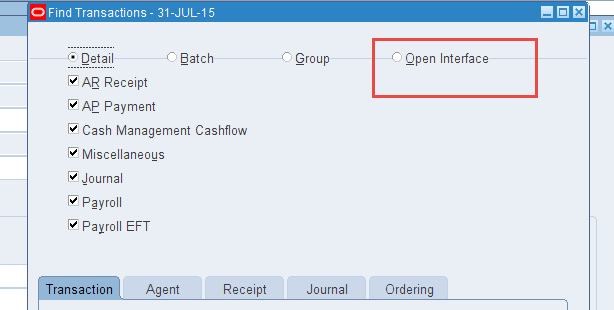
Not showing Open Interface Tab in Cash Management Form For Matching Open interface transactions for reconciliation.

https://cashmanagementcm.blogspot.com/2018/06/not-showing-open-interface-tab-in-cash.html

SOLUTION


Enable  “Use Reconciliation Open Interfaces” check box under “Open Interface Controls” in Bank Account Control screen.
Step 1. Navigate to Bank account Inquiry screen : Setup -> Bank -> Bank Account
Step 2. Find your bank and select for Update option.
Step 3. Click on “Account Control” 
Step 4. Enable the “Use Reconciliation Open Interfaces” check box.
Step 5. Click on Finish Button
Now You can to get the Open Interface Option enabled available in Form Window.

Thursday, 8 June 2017

Validation status for all Event Class is on Not Validated status in SLA Mehtod for Cash Management

http://cashmanagementcm.blogspot.com/2017/06/validation-status-for-all-event-class.html

Validation status for all Event Class is still on Not Validated Status after running Validate Application Accounting Definitions

--------------------------------------------------------------------------------------------------

In test instance please:

1) Bounce the Services/Instance.

2) Import Application Accounting Definitions
concurrent request must be run from the Cash Management responsibility
with the following parameters:

AMB CONTEXT : Default
SOURCE FILE PATHNAME : <filename with full path for CEXLAAAD.ldt>
eg. /tst/apps/apps_st/appl/ce/12.0.0/patch/115/import/US/CEXLAAAD.ldt
MERGE ANALYSIS : No
IMPORT OPTION : Merge
VALIDATE : Yes


(2).
1. Please run XLAABACR Validate Application Accounting Definitions request
Paramters:
Ledger =
Uncompile Status Only= No
Application = Cash Management
Application Accounting definition owner= Oracle

2. Review Application Accounting Definition Validation Report
All AADs (of type Oracle and User) attached to ACTIVE ledgers and ACTIVE applications must be re-validated.

Tuesday, 23 May 2017

Validation status for all Event Class is till on Not Validated status in SLA Mehtod

http://cashmanagementcm.blogspot.com/2017/05/in-test-instance-please-1-bounce.html

In the Test instance please:

1) Bounce the Services/Instance.

2) Import Application Accounting Definitions
concurrent request must be run from the Cash Management responsibility
with the following parameters:

AMB CONTEXT : Default
SOURCE FILE PATHNAME : <filename with full path for CEXLAAAD.ldt>
eg. /tst/apps/apps_st/appl/ce/12.0.0/patch/115/import/US/CEXLAAAD.ldt
MERGE ANALYSIS : No
IMPORT OPTION : Merge
VALIDATE : Yes


(2).
1. Please run XLAABACR Validate Application Accounting Definitions request
Paramters:
Ledger =
Uncompile Status Only= No
Application = Cash Management
Application Accounting definition owner= Oracle

2. Review Application Accounting Definition Validation Report
All AADs (of type Oracle and User) attached to ACTIVE ledgers and ACTIVE applications must be re-validated.

Friday, 20 January 2017

Transfer Number Skips in Bank Account Transfers

http://cashmanagementcm.blogspot.com/2017/01/transfer-number-skips-in-bank-account.html

a.
alter Sequence CE.CE_PAYMENT_TRANSACTIONS_S NOCACHE;

b.
select min_value, max_value,increment_by, cache_size, last_number from all_sequences where
sequence_name like 'CE_PAYMENT_TRANSACTIONS_S%';

It should return one row with value: cache_size as 0